Running a news website is different from managing a personal blog or a small business website. News websites publish content throughout the day, receive thousands of visitors, manage large image libraries and experience sudden traffic spikes whenever a story goes viral. Choosing the best WordPress hosting for high traffic news websites is essential if you want your website to remain fast, secure and accessible during peak traffic hours.
Imagine your website receives 5,000 visitors daily. Suddenly, one of your articles appears on Google Discover and attracts 100,000 visitors within a few hours. An ordinary shared hosting server may struggle with this unexpected increase in traffic.
Your website could become slow, display server errors or stop working altogether. As a result, you could lose advertising revenue, readers and valuable search engine visibility.
A reliable WordPress hosting provider helps reduce these risks by offering powerful servers, scalable resources, advanced caching, content delivery networks and professional technical support.
In this guide, we will compare the ten best hosting options for news publishers, explain their advantages and disadvantages, and provide a step-by-step guide to selecting, migrating and optimizing your WordPress hosting.
10 Best WordPress Hosting for High Traffic News Websites: Quick Comparison
The following hosting providers are worth considering for online newspapers, digital magazines, technology news websites and other high-traffic publishing platforms.
| Hosting provider | Best for | Hosting type | Relative cost |
|---|---|---|---|
| Cloudways | Growing news websites | Managed cloud | Moderate |
| Kinsta | Professional publishers | Managed WordPress | Moderate to high |
| Rocket.net | Global content delivery | Managed WordPress | Moderate to high |
| WP Engine | Established media websites | Managed WordPress | High |
| Pressable | Reliable publishing infrastructure | Managed WordPress | Moderate to high |
| WordPress VIP | Large media companies | Enterprise WordPress | Enterprise |
| SiteGround Cloud | Growing online magazines | Managed cloud | Moderate to high |
| WordPress.com Business | Non-technical publishers | Fully managed | Moderate |
| Pagely | Mission-critical websites | Managed enterprise | High to enterprise |
| Newspack | Professional digital newsrooms | Publishing platform | High to enterprise |
This comparison is based on published hosting features, scalability options and suitability for news publishers rather than independent hands-on load testing.
Why Do High-Traffic News Websites Need Special WordPress Hosting?
A news website places several different demands on its hosting server. Unlike a business website that might update its content once a week, a news website constantly creates and updates pages.
Large news websites may publish hundreds of articles daily, with multiple editors, journalists and administrators working simultaneously.
The best hosting for high traffic WordPress sites must support these activities without negatively affecting the reader experience.
1. Sudden traffic spikes
News traffic is often unpredictable. A trending article can receive several times more visitors than the entire website normally receives.
Common sources of unexpected traffic include Google Discover, Google News, Bing News, Facebook, Reddit, push notifications and breaking news events.
A scalable hosting environment helps publishers handle these sudden increases without exhausting server resources.
2. Frequent content publishing
A website publishing 100–200 articles daily creates thousands of new database records every month.
WordPress must manage article revisions, author information, tags, categories, featured images, comments and scheduled publishing tasks.
An underpowered server may make the WordPress dashboard slow and create problems when several journalists publish content simultaneously.
3. Search engine crawling
Search engines regularly visit news websites to discover new articles and updated content.
Repeated server errors can reduce crawling activity. Google explains that persistent connectivity and server problems can affect whether pages are crawled and remain indexed.
Reliable hosting improves technical accessibility, although it does not guarantee indexing or higher rankings.
4. Advertising scripts
Many publishers earn money through Google AdSense, Google Ad Manager, programmatic advertising and sponsored content.
Advertising scripts can increase page loading times and affect the reading experience.
Powerful hosting can improve server response times, while appropriate front-end optimization is necessary to control the performance impact of advertisements.
5. Large media libraries
A news article may contain multiple photographs, infographics and videos. Over time, these files can consume significant storage space.
News publishers should choose a hosting plan with sufficient storage, media delivery options and room for future expansion.
Top 10 Best WordPress Hosting for High Traffic News Websites
1. Cloudways – Best Flexible Cloud Hosting for Growing News Websites
Cloudways is an attractive option for publishers who want more control over their hosting resources without managing every aspect of a cloud server themselves.
Its managed cloud environment allows website owners to select server resources according to their website’s requirements.
Cloudways offers Flexible and Autonomous hosting products. Flexible provides configurable cloud resources, while Autonomous is designed to handle changing workloads through automatic scaling.
For example, a technology news website publishing 150 articles daily can start with an appropriately sized cloud server and upgrade its resources as traffic grows.
Key features
- Configurable cloud hosting resources.
- Managed server administration.
- WordPress caching options.
- Automated backup capabilities.
- Website migration assistance.
- Automatic scaling through eligible Autonomous plans.
- Support for multiple applications on compatible plans.
Advantages and disadvantages
| Advantages | Disadvantages |
|---|---|
| Flexible server configuration | Requires some technical knowledge |
| Suitable for multiple news websites | Additional services may increase costs |
| Convenient resource upgrades | Flexible plans should not be confused with automatic scaling |
| Good control over hosting resources | Server sizing requires monitoring |
Best for: Technology news websites, independent publishers, SEO agencies and owners managing multiple WordPress websites.
Cloudways is a strong starting point when searching for the best WordPress hosting for high traffic news websites with a flexible budget.
2. Kinsta – Best Managed WordPress Hosting for Professional Publishers
Kinsta is a premium managed WordPress hosting provider suitable for established blogs, professional publishers and growing media businesses.
Its infrastructure is designed specifically for WordPress websites. Publishers can manage their websites, backups, analytics and hosting resources through a dedicated dashboard.
One important benefit is the ability to evaluate PHP processing capacity. Kinsta documents its PHP thread allocations and offers options for adjusting PHP performance.
This is particularly useful for news websites with multiple authors, complex plugins and frequent publishing tasks.
Key features
- Managed WordPress infrastructure.
- CDN and caching capabilities.
- Website backups.
- WordPress migration assistance.
- Hosting analytics.
- Staging environments.
- PHP performance configuration options.
Advantages and disadvantages
| Advantages | Disadvantages |
|---|---|
| WordPress-focused infrastructure | Higher cost than budget hosting |
| Professional management dashboard | Plan-specific resource limits |
| Suitable for established publishers | Additional resources may cost extra |
| Convenient performance monitoring | Large websites may need custom plans |
Kinsta’s entry-level plan displayed a standard monthly renewal price of $35 during the November 2026 research. However, high-traffic publishers should evaluate larger plans rather than selecting hosting based on the entry price alone. Kinsta®
Best for: Established news websites, professional bloggers and publishers requiring managed WordPress hosting for high traffic.
3. Rocket.net – Best for Global News Website Performance
Rocket.net is a managed WordPress hosting provider that places significant emphasis on content delivery and website security.
News websites often receive traffic from several countries. When the hosting server is located far from the reader, network latency can increase.
Rocket.net integrates Cloudflare Enterprise into its hosting platform, helping deliver eligible cached content through distributed locations. Its platform also includes website security and migration features. Fast WordPress Hosting
This makes it a practical option for online magazines and news publications targeting readers in the USA, UK, India, Australia and other international markets.
Key features
- Cloudflare Enterprise integration.
- Global content delivery.
- Website firewall.
- Malware protection.
- Managed WordPress environment.
- Website migration assistance.
- WordPress activity logging.
Advantages and disadvantages
| Advantages | Disadvantages |
|---|---|
| Strong emphasis on global delivery | More expensive than basic hosting |
| Integrated CDN infrastructure | Resource allowances vary by plan |
| Convenient security features | Limited low-level server control |
| Suitable for cacheable news articles | Dynamic pages still require origin resources |
Best for: International news websites, advertising-supported publications and publishers looking for simplified CDN management.
Check Rocket.net hosting plans
4. WP Engine – Best for Established Media Websites
WP Engine offers managed WordPress hosting designed for businesses and organizations requiring reliable hosting, development workflows and technical support.
It can be particularly useful for media companies that regularly make changes to their WordPress themes, advertising integrations and publishing tools.
A separate staging environment allows developers to test changes before introducing them to the live website.
This can prevent problems such as broken news layouts, missing advertisements, incompatible plugins and unexpected website errors.
WP Engine also advises websites with dynamic workloads or traffic spikes to consult its team before purchasing a hosting plan. WP Engine®
Key features
- Managed WordPress infrastructure.
- Development and staging environments.
- Server-side caching.
- Backup and restoration tools.
- WordPress technical support.
- Enterprise hosting options.
- Advanced security services on eligible plans.
Advantages and disadvantages
| Advantages | Disadvantages |
|---|---|
| Professional development tools | Premium pricing |
| Suitable for established publishers | Certain plugin restrictions may apply |
| Strong WordPress specialization | Traffic spikes require appropriate plan selection |
| Convenient website management | Enterprise features can increase costs |
Best for: Established digital publishing companies, large blogs and news websites supported by developers.
5. Pressable – Best for Reliable Managed WordPress Infrastructure
Pressable is another managed WordPress hosting solution worth considering for high-traffic publications.
It is built on Automattic’s WP Cloud infrastructure, with global CDN capabilities and automatic failover features. Its hosting plans also provide WordPress-specific technical support.
Failover systems are important for news websites because infrastructure problems should not prevent readers from accessing important articles.
However, failover does not protect a website from every possible software, database or application-level error.
Key features
- WordPress-focused cloud infrastructure.
- Global content delivery.
- Automated failover capabilities.
- Managed hosting support.
- Backup and restoration features.
- Website management tools.
- Premium hosting plans.
Advantages and disadvantages
| Advantages | Disadvantages |
|---|---|
| Managed infrastructure | Plan-specific visitor allowances |
| Useful availability features | Larger plans increase hosting costs |
| WordPress-focused support | Limited server customization |
| Suitable for growing publications | Custom workloads require evaluation |
Best for: Digital magazines, growing news publishers and businesses seeking dependable managed WordPress infrastructure.
6. WordPress VIP – Best Enterprise Hosting for Large News Websites
WordPress VIP is designed for enterprise organizations, media companies and large-scale publishing operations.
Unlike ordinary hosting, an enterprise publishing platform must support complex editorial workflows, security requirements, development processes and business-critical applications.
WordPress VIP offers enterprise content management, publishing tools, scalability services and assistance with planning major traffic events. Plans, Packages & Cost
For a media company receiving millions of monthly pageviews and employing numerous journalists, enterprise-level infrastructure can be a worthwhile investment.
Key features
- Enterprise publishing infrastructure.
- High-traffic event planning.
- Security and governance capabilities.
- Professional migration services.
- Editorial workflow tools.
- Enterprise technical support.
- Content analytics options.
Advantages and disadvantages
| Advantages | Disadvantages |
|---|---|
| Designed for large organizations | Significant hosting investment |
| Advanced publishing capabilities | Not ideal for small blogs |
| Suitable for demanding workloads | Requires structured development processes |
| Professional enterprise services | Pricing requires detailed evaluation |
Best for: National newspapers, large news networks, enterprise publishers and organizations requiring WordPress hosting for millions of visitors.
7. SiteGround Cloud – Best for Growing Online Magazines
SiteGround offers managed cloud hosting for websites that require more resources than ordinary shared hosting plans.
Growing news websites often experience increasing storage requirements, higher CPU usage and larger numbers of simultaneous visitors.
SiteGround’s cloud hosting provides an upgrade path for publishers who want additional hosting resources while retaining a managed hosting environment. SiteGround Cloud Hosting
It is particularly suitable for publishers who prefer an accessible hosting dashboard instead of managing a Linux server themselves.
Key features
- Managed cloud hosting.
- Configurable server resources.
- WordPress management tools.
- Website caching capabilities.
- Backup functionality.
- Website migration options.
- Resource scaling options.
Advantages and disadvantages
| Advantages | Disadvantages |
|---|---|
| Convenient management tools | Cloud plans cost more than shared hosting |
| Suitable for growing websites | Resource upgrades increase expenses |
| Managed server environment | Limited infrastructure customization |
| WordPress optimization features | Entry resources may not suit large publishers |
Best for: Regional newspapers, online magazines and established blogs moving away from shared hosting.
Check SiteGround Cloud hosting
8. WordPress.com Business – Best for Non-Technical News Publishers
WordPress.com Business is worth considering if you want to concentrate on writing and publishing content rather than maintaining hosting servers.
It provides a managed environment with WordPress functionality, plugin support and website management capabilities.
WordPress.com lists substantial storage allowances and managed hosting features on its Business plan. Publishers should still verify that their advertising tools, custom plugins and editorial workflows are compatible.
Key features
- Fully managed hosting environment.
- Custom WordPress plugins and themes.
- Integrated website management.
- Security management.
- Backup capabilities.
- Hosting support.
- Publishing tools.
Advantages and disadvantages
| Advantages | Disadvantages |
|---|---|
| Easy website management | Less infrastructure-level control |
| Suitable for non-technical users | Custom workflows require compatibility checks |
| Reduces server administration | Storage limits apply |
| Managed WordPress platform | Enterprise publishers may need another solution |
Best for: Independent journalists, small media organizations and publishers without a dedicated IT team.
Check WordPress.com hosting plans
9. Pagely – Best for Mission-Critical Publishing Websites
Pagely offers premium managed WordPress hosting aimed at websites requiring dependable infrastructure and professional server management.
It is suitable for media organizations where website downtime can cause significant financial and operational losses.
Pagely’s managed services include infrastructure maintenance, security updates and performance optimization. Pagely Pricing
Publishers considering Pagely should discuss expected traffic patterns and application requirements with its technical team.
Key features
- Managed enterprise infrastructure.
- WordPress performance optimization.
- Managed security updates.
- Professional hosting support.
- Custom hosting configurations.
- Infrastructure maintenance.
Advantages and disadvantages
| Advantages | Disadvantages |
|---|---|
| Suitable for mission-critical websites | High hosting costs |
| Professional infrastructure management | Excessive for small publications |
| Advanced hosting options | Technical planning may be necessary |
| Designed for demanding websites | Costs depend on configuration |
Best for: Large news organizations, established media companies and enterprise publishing networks.
10. Newspack – Best Hosting and Publishing Platform for Newsrooms
Newspack differs from traditional WordPress hosting because it combines website infrastructure with tools specifically designed for news organizations.
Its platform includes hosting, editorial features, newsletter tools, advertising functionality, subscriptions and audience management capabilities.
During the November 2026 research, Newspack listed pricing starting at $750 per month for eligible publications generating less than $300,000 in annual revenue. Newspack
Although it is more expensive than conventional WordPress hosting, the package includes additional publishing and revenue-management services.
Key features
- News-focused WordPress platform.
- Managed website hosting.
- Newsletter integration.
- Advertising management tools.
- Subscription and paywall functionality.
- Website migration assistance.
- Technical and design support.
Advantages and disadvantages
| Advantages | Disadvantages |
|---|---|
| Designed specifically for news publishers | Expensive for independent bloggers |
| Combines hosting and publishing tools | Eligibility restrictions may apply |
| Integrated monetization options | Less suitable for ordinary business websites |
| Professional newsroom support | Pricing depends partly on publication revenue |
Best for: Professional newspapers, independent media businesses and subscription-based news organizations.
Which WordPress Hosting Is Best for Your Monthly Traffic?
There is no universal hosting configuration that can handle a specific number of monthly visitors.
A properly cached website receiving one million pageviews may require fewer server resources than a poorly optimized website receiving 100,000 pageviews.
The following table provides approximate starting configurations for traditional cloud servers. These are planning estimates, not guaranteed capacity limits.
| Monthly pageviews | Suggested CPU | Suggested RAM | Hosting type |
|---|---|---|---|
| Under 50,000 | 1–2 vCPU | 1–2 GB | Quality shared or cloud |
| 50,000–200,000 | 2 vCPU | 2–4 GB | Managed cloud |
| 200,000–500,000 | 2–4 vCPU | 4–8 GB | Managed cloud |
| 500,000–1 million | 4–8 vCPU | 8–16 GB | Scalable cloud |
| 1–5 million | 8–16 vCPU | 16–32 GB | Advanced cloud |
| 5–10 million | Workload-dependent | Workload-dependent | High-availability cloud |
| Above 10 million | Custom configuration | Custom configuration | Enterprise hosting |
For managed WordPress platforms that do not disclose CPU or RAM allocations, compare PHP workers, bandwidth, storage allowances and uncached request capacity instead.
Actual server requirements depend on your WordPress theme, caching configuration, database size, plugins and peak concurrent traffic.
How Much Does High-Traffic WordPress Hosting Cost?
The best WordPress hosting for high traffic news websites does not necessarily need to be the most expensive option.
Your hosting expenses should reflect your website’s operational requirements and revenue potential.
| Website size | Monthly hosting budget estimate |
|---|---|
| Small news website | $15–$50 |
| Growing digital magazine | $50–$150 |
| Established news website | $150–$400 |
| Large news publication | $400–$1,500 |
| Enterprise media network | $1,500–$5,000+ |
These are budgeting estimates rather than current provider quotations.
How to Choose the Best WordPress Hosting for High Traffic News Websites?
Selecting a hosting provider requires more than checking introductory prices or advertised visitor limits.
Follow these steps before purchasing a hosting plan.
Step 1: Analyze your existing website traffic
Open Google Analytics 4 and review your website’s traffic for the previous 30–90 days.
Check monthly pageviews, peak hourly traffic, traffic sources, visitor locations, mobile traffic and highly visited articles.
Pay particular attention to periods when your website receives unusually high traffic.
For example, a website may receive 500,000 monthly pageviews, but 100,000 of those pageviews could occur during a single major news event.
In such situations, peak traffic capacity matters more than monthly averages.
Step 2: Check your current server resources
Open your hosting dashboard and review your website’s resource consumption.
Important hosting metrics include:
| Server metric | What it indicates |
|---|---|
| CPU usage | Processing workload |
| RAM usage | Available memory |
| Disk I/O | Storage read and write activity |
| PHP workers | Concurrent uncached PHP processing capacity |
| Bandwidth | Data transferred |
| Database connections | Database workload |
| Cache hit rate | Requests served from cached content |
| TTFB | Time until the response begins |
If your website frequently reaches its resource limits, upgrading or optimizing the hosting environment may be necessary.
Step 3: Select the correct hosting type
There are several types of hosting available for WordPress websites.
- Shared hosting: Multiple websites share common server resources. It is inexpensive but may be unsuitable for demanding news websites.
- VPS hosting: Offers an allocated virtual server environment and greater control over available resources.
- Cloud hosting: Offers flexible infrastructure configurations and resource upgrades. Some cloud platforms also support automatic scaling.
- Managed WordPress hosting: The hosting company handles many technical tasks connected with maintaining the WordPress environment.
- Enterprise hosting: Suitable for complex, business-critical applications requiring customized infrastructure and professional support.
For most growing news websites, managed WordPress hosting or scalable WordPress cloud hosting provides a useful balance between performance and administration.
Step 4: Check PHP workers and uncached traffic capacity
PHP workers process requests that cannot be delivered directly from the page cache.
When every available worker is occupied, additional requests may have to wait.
This can cause slow administration pages, delayed article publishing and application errors.
How caching reduces PHP server workload?
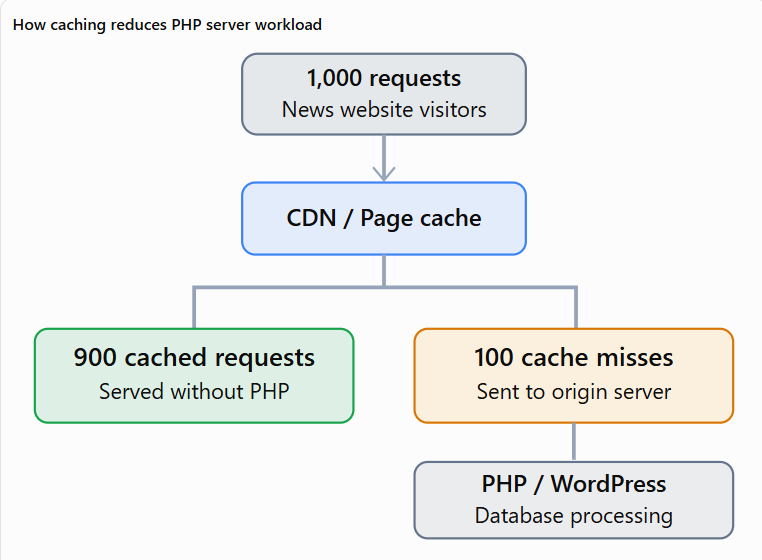
Before purchasing a hosting plan, ask the provider how many PHP workers are available, whether additional capacity can be purchased and how the platform handles sudden increases in uncached requests.
PHP capacity is particularly important for logged-in users, editorial dashboards, membership websites and dynamically generated pages.
Step 5: Choose the right server location
Your hosting server should ideally be located close to your primary audience.
| Target audience | Suitable server region |
|---|---|
| United States | US East or US Central |
| United Kingdom | London |
| India | Mumbai or another suitable Indian region |
| Australia | Sydney |
| Singapore | Singapore |
| European countries | Central or Western Europe |
| Global audience | Primary audience region with global CDN |
A content delivery network can reduce the impact of distance for cached content. However, dynamic requests may still need to travel to the original hosting server.
Step 6: Compare total hosting costs
Do not choose a provider simply because it advertises affordable introductory pricing.
Check whether you may need to pay extra for:
- Additional bandwidth.
- Extra website installations.
- Increased storage.
- More PHP workers.
- Premium CDN services.
- Advanced security.
- Hourly backups.
- Technical support upgrades.
- Traffic overage charges.
- Website migration.
A transparent hosting plan helps you avoid unexpected expenses when your news website becomes popular.
Step 7: Test hosting performance before committing
Migrate a copy of your website to a staging environment and test the new hosting infrastructure.
Use available tools such as:
| Testing tool | Purpose |
|---|---|
| Google PageSpeed Insights | Page performance and Core Web Vitals |
| GTmetrix | Page loading diagnostics |
| WebPageTest | Regional loading performance |
| Grafana k6 | Controlled load testing |
| UptimeRobot | Website availability monitoring |
| Query Monitor | WordPress database and plugin debugging |
Test both cached and uncached pages. Also test article publishing, website search and WordPress dashboard performance.
Obtain the hosting provider’s permission before performing substantial load tests.
Recommended Server Configuration for News Websites
If your WordPress website publishes approximately 100–200 articles daily, you should pay particular attention to the database, PHP processing capacity and caching architecture.
The following configuration is a reasonable starting point for evaluating a growing news website.
| Component | Suggested configuration |
|---|---|
| CPU | 4–8 vCPU |
| RAM | 8–16 GB |
| Storage | NVMe SSD where available |
| PHP | Supported PHP 8.x version compatible with your plugins |
| PHP memory limit | 256–512 MB per process, where appropriate |
| Database | Supported MySQL or MariaDB version |
| Object caching | Redis where supported |
| Page caching | Server-level full-page caching |
| CDN | Cloudflare or equivalent |
| SSL | HTTPS enabled |
| Backups | Daily or more frequently |
| Monitoring | Continuous uptime and resource monitoring |
| Firewall | WAF and DDoS mitigation |
This configuration must be validated against actual website traffic and workload. Increasing every resource unnecessarily can lead to avoidable hosting expenses.
How to Configure WordPress Hosting for Maximum News Website Performance?
Even the fastest WordPress hosting for publishers can perform poorly when the website is not properly optimized.
Follow these steps after selecting your hosting provider.
Step 1: Enable full-page caching
Full-page caching stores a generated version of your article so that WordPress does not need to process every visitor request from scratch.
Depending on your server environment, you can use the host’s built-in caching or compatible WordPress tools.
Popular options include WP Rocket, LiteSpeed Cache, WP Super Cache and W3 Total Cache.
Avoid enabling several overlapping full-page caching systems without understanding how they interact.
Step 2: Configure a content delivery network
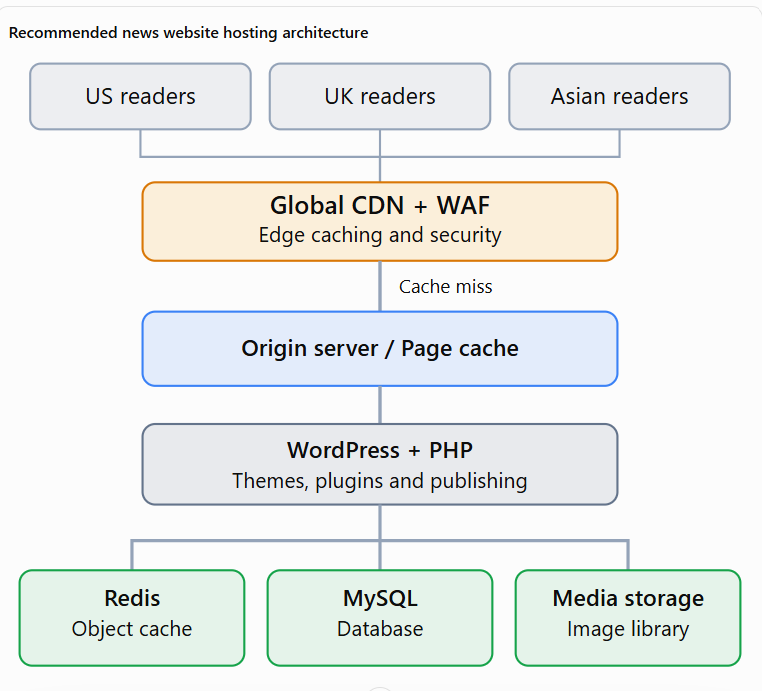
A CDN distributes eligible website content across multiple locations.
When a visitor opens an article, the CDN can deliver cached content from an appropriate location rather than repeatedly requesting it from the original hosting server.
Recommended news website hosting architecture
For Cloudflare configuration, follow this basic process:
- Create a Cloudflare account.
- Add your website domain.
- Review the imported DNS records.
- Update the nameservers at your domain registrar if required by the setup.
- Enable an appropriate SSL configuration, preferably Full (strict) with a valid origin certificate.
- Configure caching for eligible public content.
- Exclude administrative, login and personalized pages from public caching.
- Enable appropriate security controls.
- Test the website and article publishing process.
Do not configure unrestricted HTML caching across your entire website without testing login sessions, comments, subscriptions and personalized pages.
Step 3: Enable Redis object caching
Redis can reduce repeated database queries by storing frequently accessed objects in memory.
It is especially useful for WordPress websites with large archives, complex navigation, related article functionality and multiple editorial users.
First, confirm that your hosting provider supports Redis. Enable the service and install the compatible integration if required.
After configuration, verify the connection and monitor whether database performance improves.
Step 4: Optimize your WordPress database
News websites can accumulate unnecessary database records over time.
Common examples include expired transients, excessive post revisions, spam comments and unused plugin data.
You can use compatible database optimization tools such as WP-Optimize or Advanced Database Cleaner.
Always create a complete backup before deleting database records.
Avoid deleting editorial revisions that your newsroom needs for accountability or article recovery.
Step 5: Optimize featured images
Large images can consume bandwidth and delay article rendering.
News publishers should resize images appropriately, use efficient image formats such as WebP or AVIF where supported, and generate suitable responsive image sizes.
Lazy-load images below the visible portion of the article, but avoid lazy-loading the primary image responsible for the page’s Largest Contentful Paint.
Step 6: Optimize WordPress scheduled tasks
WordPress uses WP-Cron to perform scheduled activities such as publishing articles, running plugin tasks and checking for updates.
Busy publishing websites may benefit from a properly configured server-level cron job.
Ask your hosting provider to configure a genuine scheduled task before disabling the default WordPress cron trigger.
This can improve the reliability of scheduled publishing and reduce unnecessary background activity.
How to Improve Core Web Vitals for News Websites?
The best WordPress hosting for high traffic news websites should support a fast website experience, but hosting alone cannot guarantee that every page passes Core Web Vitals.
Google recommends achieving good Core Web Vitals to support a positive user experience. Google for Developers
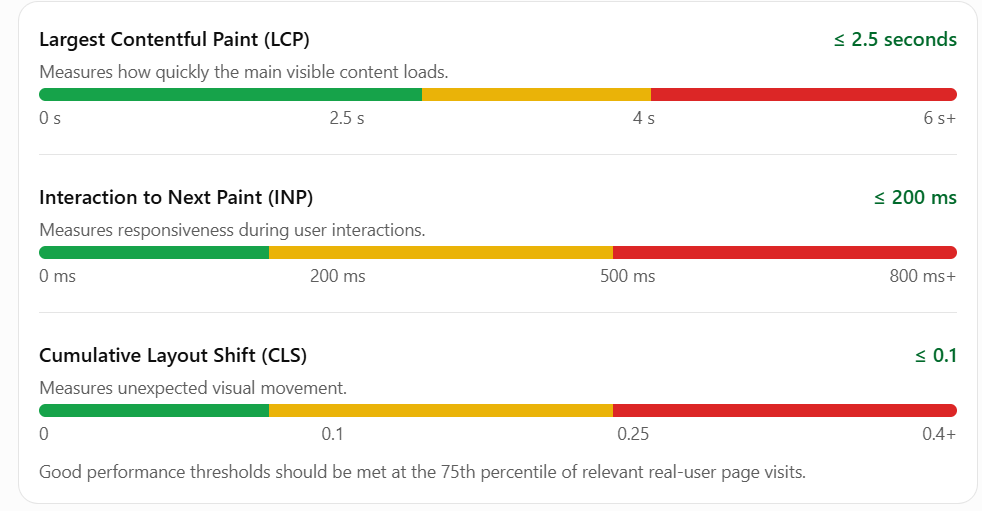
The three principal Core Web Vitals metrics are LCP, INP and CLS.
How to improve LCP
Use fast hosting, optimize featured images, enable page caching, reduce unnecessary CSS and prioritize the most important visible content.
News websites should avoid excessively large homepage sliders and heavy header designs where they delay main content.
How to improve INP
Reduce unnecessary JavaScript, remove inefficient plugins, optimize advertising scripts and limit expensive browser-side operations.
A faster server helps some interactions, but many INP problems occur inside the visitor’s browser.
How to reduce CLS
Reserve sufficient space for advertisements, define image dimensions and prevent late-loading banners from moving article content.
You should also optimize web font loading and test your website on mobile devices.
Visit Google PageSpeed Insights to evaluate your website’s performance.
How to Prepare Your News Website for Google Discover Traffic?
Google Discover can generate substantial traffic in a relatively short period.
A website that performs well during normal hours may struggle when thousands of readers open an article simultaneously.
Example of a breaking news traffic spike
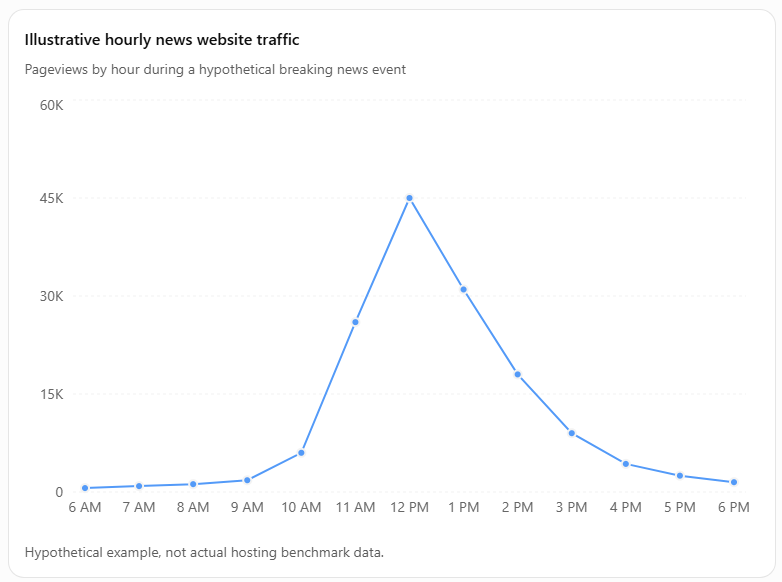
To prepare your website for these situations, enable full-page caching, choose a scalable hosting environment, monitor PHP capacity and discuss burst traffic with your hosting provider.
Also, make sure newly published articles can be distributed through your CDN without unnecessarily clearing the entire website cache.
When editors update an article, selectively invalidate the article and relevant archive pages instead of purging thousands of unrelated URLs.
This strategy reduces the workload on your original hosting server.
How Does WordPress Hosting Affect Google and Bing SEO?
Hosting is an important part of technical SEO because search engines need to access website content consistently.
However, purchasing an expensive hosting plan does not automatically improve search rankings.
Hosting and crawl efficiency
Websites with frequent timeout errors may experience crawling difficulties.
Check the Crawl Stats report in Google Search Console and website diagnostics in Bing Webmaster Tools to identify potential accessibility problems.
Hosting and indexing
Search engines must successfully retrieve your articles before evaluating them for indexing.
Make sure your firewall does not accidentally block legitimate search engine crawlers.
Google’s guidance published in November 2026 specifically advises publishers to prepare their origin infrastructure and avoid blocking verified Google crawlers when introducing a CDN. Google for Developers
Hosting and user experience
A fast website makes articles easier to read and reduces unnecessary waiting.
However, overall performance also depends on your WordPress theme, images, advertisements and JavaScript.
Important HTTP status codes
| Status code | Meaning | Recommended action |
|---|---|---|
| 200 | Successful request | No action required |
| 301 | Permanent redirect | Verify the destination |
| 403 | Access forbidden | Check firewall and security rules |
| 429 | Too many requests | Review rate limits and traffic |
| 500 | Internal server error | Check application and server logs |
| 502 | Bad gateway | Inspect upstream services |
| 503 | Service unavailable | Check resources or maintenance |
| 504 | Gateway timeout | Investigate PHP and database delays |
Repeated server errors should be investigated immediately.
How to Migrate a High-Traffic WordPress News Website Without Unnecessary Downtime
Website migration requires careful planning, especially when journalists continue publishing articles throughout the day.
Follow this process to minimize disruption.
Step 1: Create a complete website backup
Back up your WordPress database, themes, plugins, media files, configuration files and server settings.
Store a backup independently of your existing hosting account.
Step 2: Set up the new hosting environment
Purchase the appropriate hosting plan, configure the destination server and confirm that the WordPress requirements are compatible.
Do not cancel your existing hosting plan.
Step 3: Create a staging copy
Transfer your website to the new hosting provider without changing the public domain immediately.
Use an access-controlled staging environment for testing.
Step 4: Test website functionality
Verify article pages, homepage, category pages, WordPress administration, advertisements, contact forms, search functionality and subscription features.
Also check canonical tags, XML sitemaps, RSS feeds and robots.txt.
Step 5: Synchronize the latest content
A news website may publish dozens of articles during the migration process.
Coordinate a final database and media synchronization with your hosting provider.
For active websites, arrange a brief editorial freeze or use a provider-supported synchronization approach to avoid losing new articles and comments.
Step 6: Update DNS records
Point your website to the new hosting environment.
Ensure that your email-related DNS records are preserved.
DNS changes may take time to propagate, so keep the previous server available during the transition.
Step 7: Verify the live website
Check that the public website uses the correct SSL certificate and returns successful HTTP responses.
Remove any staging-related search engine restrictions from the production website.
Monitor server logs, website traffic and indexing reports.
Step 8: Cancel old hosting only after validation
Keep the previous hosting environment available until the new server is stable, DNS propagation is complete and you have confirmed that important content has been transferred successfully.
This provides an additional recovery option if unexpected problems occur.
Common Hosting Mistakes News Website Owners Should Avoid
Many publishers make hosting decisions based only on price, storage or the advertised number of visitors.
Avoid these common mistakes:
- Purchasing the cheapest hosting plan for a demanding website.
- Ignoring peak traffic and concurrent visitor requirements.
- Installing multiple conflicting caching plugins.
- Using unnecessarily heavy WordPress themes.
- Failing to configure automatic backups.
- Hosting large video files directly without a suitable delivery strategy.
- Clearing the entire website cache after every new article.
- Ignoring database performance and PHP limits.
- Using aggressive firewall rules that block legitimate crawlers.
- Selecting long-term hosting contracts without testing the website.
The best web hosting for news websites is a combination of appropriate infrastructure, efficient WordPress configuration and regular monitoring.
Which Hosting Provider Should You Choose?
Select your hosting provider according to your website’s actual requirements rather than relying solely on general hosting rankings.
| Your website requirement | Recommended shortlist |
|---|---|
| Growing news website with limited budget | Cloudways Flexible |
| Frequent and unpredictable viral traffic | Cloudways Autonomous, Rocket.net |
| Professional managed WordPress hosting | Kinsta, Pressable |
| Established media website | WP Engine |
| International news audience | Rocket.net, Kinsta |
| Large digital publishing organization | WordPress VIP, Pagely |
| Newsroom with advertising and subscriptions | Newspack |
| Non-technical independent publisher | WordPress.com Business |
| Upgrading from shared hosting | SiteGround Cloud |
| Managing several news websites | Cloudways, appropriately sized multi-site plans |
For publishers operating several websites, a managed cloud environment can provide flexibility.
However, consider isolating large or business-critical websites so that a traffic spike on one website does not exhaust the resources available to others.
Frequently Asked Questions
Cloudways, Kinsta, Rocket.net, Pressable and WP Engine are strong options for established news websites. WordPress VIP and Pagely are worth considering for larger enterprise publications. The most suitable provider depends on your budget, traffic spikes, server requirements, publishing frequency and technical support needs.
Yes. WordPress can handle one million monthly visitors and considerably larger audiences when supported by suitable infrastructure, efficient themes, page caching, database optimization and a CDN. There is no fixed traffic limit built into WordPress. Actual capacity depends on how the application and hosting environment are configured.
Shared hosting can be suitable for a new or small news website receiving limited traffic. However, established publishers may experience resource restrictions when traffic increases. Managed cloud hosting or premium managed WordPress hosting is generally a more scalable option for websites with frequent publishing and unpredictable traffic spikes.
A growing news website can evaluate configurations with 4–8 GB of RAM as a starting point, while more demanding publications may require 16–32 GB or more. The appropriate amount depends on PHP processing, database workload, background tasks, caching efficiency and concurrent traffic. Monitoring actual memory consumption is essential.
Cloudways can be a practical option for publishers who require configurable cloud resources. Its Flexible hosting provides resource selection and upgrade options, while Autonomous is designed for automatic scaling. Choose the appropriate product and validate its performance against your website’s actual traffic and publishing requirements.
Kinsta, Rocket.net, Cloudways, Pressable and WP Engine are worth evaluating when website performance is a priority. However, no provider is universally the fastest for every website. Server location, cache efficiency, WordPress configuration, advertisement scripts and the number of uncached requests influence actual performance.
Hosting can indirectly affect SEO through website availability, server response times, crawl accessibility and page experience. Reliable hosting helps search engines access content consistently. However, switching to an expensive hosting provider does not guarantee better rankings, faster indexing or inclusion in Google Discover.
Cloudflare is not mandatory, but a reliable CDN and security layer can be extremely useful for busy news websites. Cloudflare can help deliver cached content, reduce origin server workload and protect against certain malicious traffic patterns. Other suitable CDN services may provide similar benefits depending on their configuration.
Managed cloud hosting and premium managed WordPress hosting are suitable options to evaluate. Cloudways, Kinsta, Pressable and WP Engine offer different approaches to these workloads. Pay particular attention to database capacity, editorial user activity, background tasks, storage growth, selective cache invalidation and reliable scheduled publishing.
A hosting budget of approximately $50–$300 per month may be a starting point for an efficiently cached WordPress website receiving one million pageviews. However, complex applications, high-resolution images, frequent traffic spikes, premium support and dynamic content can increase costs substantially. Request a workload-specific estimate before purchasing.
Yes, compatible cloud hosting platforms allow multiple WordPress websites to operate on a single server. However, these websites may compete for CPU, memory and other resources. For important publishing websites, consider separate servers or isolated hosting environments to reduce the risk of one website affecting the others.
Choose suitable hosting resources, enable caching, use a CDN, optimize database queries, remove unnecessary plugins and monitor website availability. Prepare for unexpected traffic increases by discussing scaling options with your provider. Maintain independent backups and test your restoration process regularly.
Conclusion
Choosing the best WordPress hosting for high traffic news websites is one of the most important decisions for a growing digital publishing business.
A suitable hosting environment helps your website handle traffic spikes, support frequent article publishing, reduce server errors and provide a better experience for readers.
Cloudways is worth considering if you want flexible cloud infrastructure. Kinsta and Pressable are attractive options for managed WordPress hosting, while Rocket.net is suitable for publishers prioritizing global content delivery.
Large media organizations with complex requirements should evaluate WordPress VIP, Pagely or Newspack.
Remember that hosting alone cannot solve every performance problem. You also need an efficient WordPress theme, properly configured caching, optimized images, a well-maintained database and responsible advertisement integration.
Before purchasing a long-term hosting plan, analyze your traffic, evaluate the provider’s resource limits and test your own website under realistic workloads.
Investing in the right hosting infrastructure can help your news website remain accessible as your audience and publishing operations grow.




Leave a Reply
You must be logged in to post a comment.